





Have you ever wondered why some companies scale effortlessly while others struggle to manage basic daily tasks? The secret often lies in how effectively you leverage technology to handle repetitive work. Achieving Automation Mastery is not just about saving time; it is about building a foundation for sustainable, long-term success.
By shifting your focus from manual labor to streamlined digital workflows, you unlock hidden potential within your organization. This automation checklist serves as your roadmap to identify high-impact areas that require immediate improvement. You will learn how to replace fragmented processes with reliable systems that drive consistent growth.
Embracing these changes allows you to reclaim your schedule and focus on high-level strategy. As you implement these steps, you will notice a significant increase in operational efficiency. Prepare to transform your business operations into a well-oiled machine that works for you around the clock.
Key Takeaways
- Identify repetitive tasks that hinder your daily productivity.
- Use structured guides to prioritize high-impact process improvements.
- Transition from manual workflows to scalable digital systems.
- Enhance operational efficiency to support long-term business growth.
- Focus your energy on strategic goals rather than administrative burdens.
Start Your Automation Journey Today
Eliminate repetitive tasks, streamline workflows, and boost productivity with powerful automation tools. Create your free account today and discover smarter ways to grow your business efficiently.
The Strategic Importance of Automation Mastery
In today’s fast-paced digital economy, why automated mastery has become the ultimate differentiator for successful enterprises is clear. By integrating intelligent systems, you move your team away from repetitive labor and toward high-value creative problem-solving. Achieving Automation Mastery allows your business to remain agile while competitors struggle with legacy bottlenecks.
Defining Your Automation Goals
Before you deploy any new software, you must establish clear and measurable objectives. You should identify specific pain points that hinder your daily productivity on your automation mastery journey. Setting these benchmarks ensures that your transition is not just a technical upgrade, but a strategic business move.
Consider the following comparison to understand the impact of shifting your operational focus:
| Process Type | Manual Execution | Automated Execution | Strategic Benefit |
|---|---|---|---|
| Data Entry | High Error Rate | Zero Errors | Data Integrity |
| Lead Follow-up | Delayed Response | Instant Trigger | Higher Conversion |
| Reporting | Weekly Manual Task | Real-time Dashboard | Faster Decisions |
Aligning Technology with Business Objectives
True Automation Mastery requires that every tool you select serves a specific purpose in your growth roadmap. You must avoid the trap of adopting technology simply because it is popular or trendy. Instead, evaluate how each platform supports your long-term vision for scalability.
Understanding why automated mastery is essential involves looking at the return on investment for your time and capital. When your software stack aligns perfectly with your core business goals, you create a seamless environment for growth. This alignment ensures that your digital infrastructure supports your team rather than creating new layers of complexity.
Auditing Your Current Business Processes
Developing strong automation skills begins with a deep dive into your daily business activities. Before you invest in expensive software, you must understand exactly how your team spends their time. This audit serves as the foundation for every efficiency gain you hope to achieve through automation mastery.
Identifying Repetitive Manual Tasks
Start by tracking every task performed by your staff over a standard work week. You will likely find that many high-value employees spend hours on low-value, repetitive data entry or manual reporting. These tasks are prime candidates for digital transformation and automation mastery.
To effectively categorize these activities, consider the following criteria:
- Frequency: Does this task happen daily, weekly, or monthly?
- Complexity: Does the task require subjective human judgment or simple rule-based logic?
- Impact: How much does this task contribute to your core revenue goals?
“Efficiency is doing things right; effectiveness is doing the right things.”
Mapping Workflow Bottlenecks
Once you have identified the manual labor, you must visualize how work moves through your organization. Mapping your workflows helps you see where information gets stuck or where communication breaks down. Improving your automation skills allows you to spot these friction points before they impact your bottom line.
Consider the common areas where productivity often stalls:
| Workflow Stage | Common Symptom | Potential Fix |
|---|---|---|
| Lead Intake | Delayed response times | Automated CRM triggers |
| Invoicing | Manual data entry errors | Cloud-based accounting sync |
| Project Updates | Email thread confusion | Centralized task management |
By documenting these bottlenecks, you gain a clear roadmap for your next steps toward automation mastery. You are no longer guessing where to apply technology; you are making data-driven decisions to optimize your entire operation. This disciplined approach ensures that your automation skills translate into measurable business growth.
Selecting the Right Automation Tools
Building a robust automation ecosystem starts with selecting the right software stack for your unique business needs and automation mastery goals. You must prioritize platforms that offer flexibility and long-term scalability to ensure your investment remains valuable as you grow. Developing your automation skills allows you to identify which tools will truly move the needle for your organization.
Unlock Complete Automation Mastery
Transform manual processes into automated systems that save time, reduce errors, and increase efficiency. Start your free trial and experience seamless business automation today.
Evaluating CRM and Marketing Platforms
When you assess CRM and marketing software, look for native integration capabilities that connect your data silos. Platforms like HubSpot, Salesforce, or MailerRocket provide extensive ecosystems that allow you to automate lead nurturing without manual intervention. Data consistency is the primary benefit of choosing a platform that plays well with your existing digital tools for automation mastery.
You should also consider the ease of use for your team members. If a tool is too complex, your staff may struggle to maintain the workflows you create. Refining your automation skills involves selecting software that balances powerful features with an intuitive user interface.
Integrating Project Management Software
Selecting project management software requires a focus on how well it synchronizes with your communication and financial tools. Solutions such as Asana, Trello, or Monday.com offer robust API connections that keep your team aligned on deadlines and deliverables. Automated task assignment ensures that no project falls through the cracks during busy periods.
To maintain a seamless workflow, verify that your chosen project management tool supports real-time updates across all connected devices. This level of synchronization is essential for maintaining high productivity levels. By applying your automation skills to these integrations, you create a unified environment where data flows freely between departments.
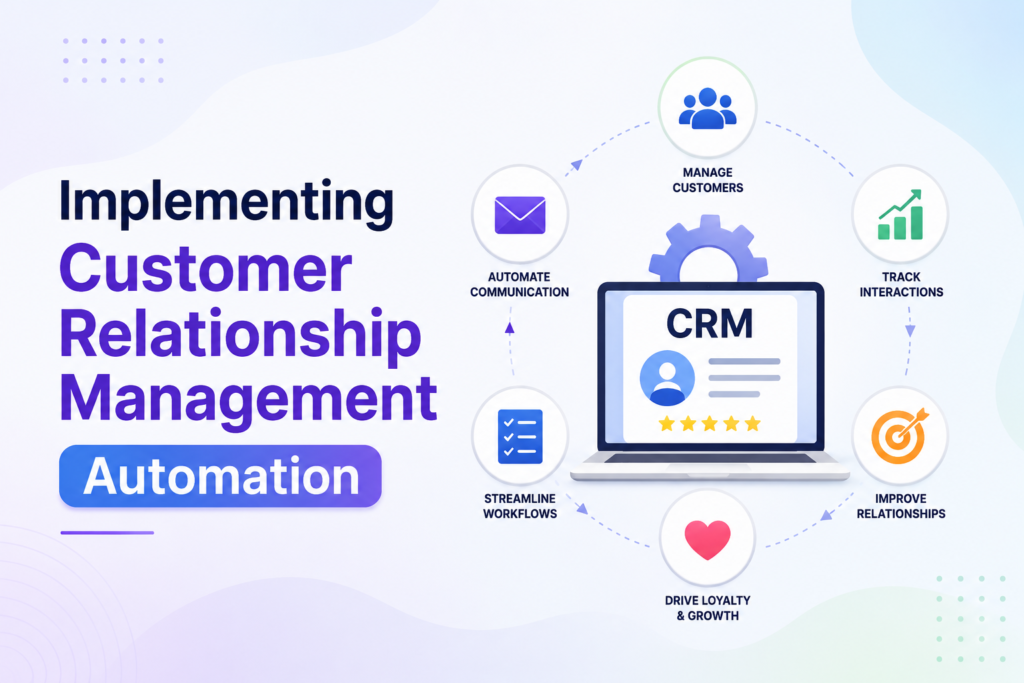
Implementing Customer Relationship Management Automation
Understanding why automated mastery is essential begins with your customer relationship management processes. By removing repetitive tasks from your daily operations, you allow your team to focus on high-value interactions that drive revenue. This strategic shift ensures that no prospect falls through the cracks and every client feels valued.
Streamlining Lead Nurturing Sequences
Effective lead nurturing relies on delivering the right message at the perfect moment. You can design automated sequences that trigger based on specific user behaviors, such as downloading a whitepaper or visiting a pricing page. This personalized approach keeps your brand top-of-mind without requiring constant manual intervention.
When you map out these journeys, ensure your content addresses the specific pain points of your audience. Automated workflows allow you to segment your leads effectively, ensuring that your marketing efforts remain relevant and highly targeted. Consistency is the key to building long-term trust with potential buyers and achieving automation mastery.
Automating Customer Support Ticketing
Managing customer inquiries manually often leads to bottlenecks and frustrated clients. By implementing an automated ticketing system, you ensure that every request is categorized, prioritized, and routed to the correct department immediately. This seamless process guarantees that your response times remain competitive, regardless of your team’s current workload.
These systems also provide valuable insights into common customer issues, allowing you to refine your product or service offerings. You can set up automated responses for frequently asked questions, which provides instant gratification for your users. Embracing this technology is a core component of why automated mastery provides such a significant competitive advantage in today’s market.
| Feature | Manual Process | Automated Process |
|---|---|---|
| Lead Follow-up | Delayed/Inconsistent | Instant/Personalized |
| Support Response | High Human Error | Standardized/Fast |
| Data Entry | Time-Consuming | Real-time Syncing |
| Scalability | Limited by Staff | Highly Scalable |
Optimizing Financial and Administrative Workflows
Administrative burdens often act as a silent anchor on your company’s growth potential. When your team spends hours on manual data entry, they lose the capacity to focus on high-value strategic initiatives. Implementing effective automation strategies allows you to reclaim this lost time and improve overall accuracy while advancing automation mastery.
Automating Invoicing and Expense Tracking
Manual billing processes are prone to human error and often lead to delayed payments. By utilizing platforms like QuickBooks or FreshBooks, you can trigger invoices automatically based on project milestones or recurring schedules. This ensures that your cash flow remains consistent without requiring constant manual oversight.
Real-time expense tracking further enhances your financial visibility. Modern automation strategies allow employees to scan receipts via mobile apps, which then sync directly with your accounting software. This eliminates the need for physical filing and provides you with an up-to-the-minute view of your burn rate.
- Instant reconciliation of bank feeds.
- Automated payment reminders for overdue accounts.
- Seamless integration with tax preparation software.
Managing Payroll and Compliance Digitally
Payroll management is a critical function that demands absolute precision to avoid legal complications. Digital platforms like Gusto or ADP simplify this by calculating taxes, deductions, and benefits automatically. These tools ensure that your business remains compliant with ever-changing federal and state regulations.
By centralizing your payroll data, you minimize the risk of manual entry mistakes that often trigger audits. These automation strategies provide a secure audit trail for every transaction, giving you peace of mind during tax season. Adopting these digital solutions is a vital step in scaling your operations efficiently.
| Feature | Manual Process | Automated Process |
|---|---|---|
| Data Entry | High Error Risk | Zero Error |
| Processing Time | Days | Minutes |
| Compliance | Manual Tracking | Real-time Updates |
Ultimately, shifting to digital workflows is not just about saving time; it is about building a resilient financial foundation. As you refine your automation strategies, you will find that your administrative team can pivot toward more meaningful analytical work, driving your business toward long-term success.
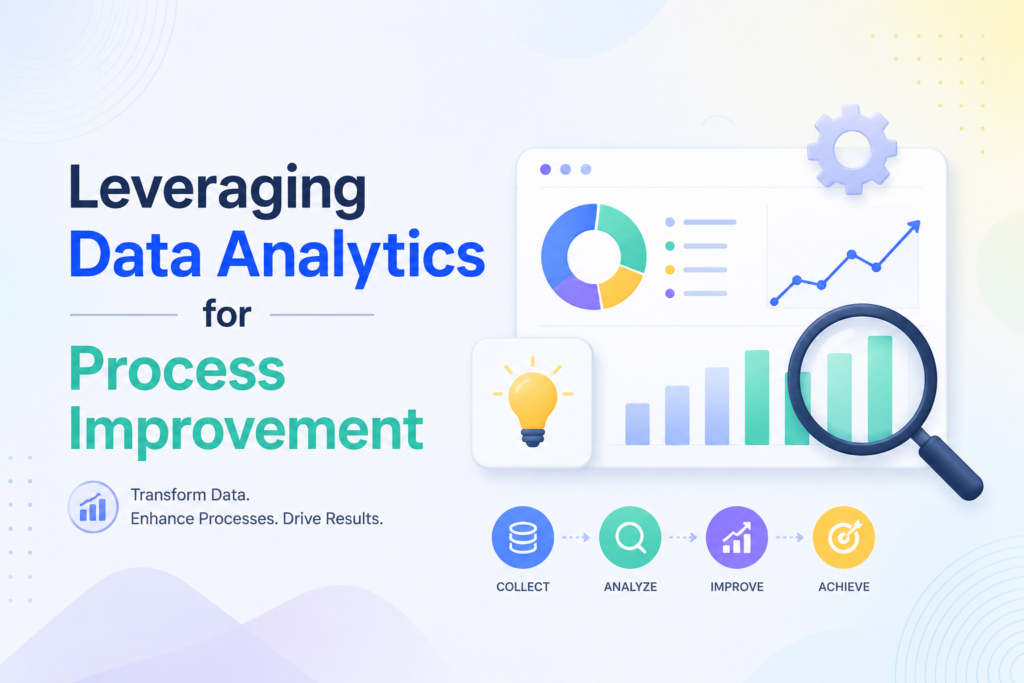
Leveraging Data Analytics for Process Improvement
You can transform your business operations by turning raw data into a clear roadmap for success. Data-driven decision-making is the cornerstone of modern growth, allowing you to move beyond guesswork. By implementing smart automation strategies, you gain the ability to monitor your operational health in real time and strengthen automation mastery.
Tracking Key Performance Indicators
To improve your processes, you must first define which metrics truly impact your bottom line. Focusing on the wrong data points often leads to wasted effort and missed opportunities. You should prioritize metrics that provide a clear view of your efficiency and output quality.
Consider tracking these essential performance metrics to refine your automation strategies:
- Cycle Time: The total time taken to complete a specific business process.
- Error Rate: The frequency of manual corrections needed in automated workflows.
- Resource Utilization: How effectively your team and software tools are deployed.
- Customer Response Time: The speed at which your support systems address inquiries.
Using Automated Reporting Dashboards
Manual data compilation is a drain on your leadership team’s time and energy. By utilizing automated reporting dashboards, you provide your stakeholders with actionable intelligence at a glance. These tools aggregate data from disparate sources, ensuring that your insights are always current and accurate.
The following table outlines how automated reporting improves your decision-making speed compared to traditional manual methods:
| Feature | Manual Reporting | Automated Dashboards |
|---|---|---|
| Data Latency | Days or Weeks | Real-time |
| Accuracy | Prone to Human Error | High Precision |
| Accessibility | Static Documents | Interactive Views |
Integrating these dashboards into your daily routine ensures that your automation strategies remain aligned with your long-term goals. When you remove the friction of data gathering, you empower your team to focus on high-level strategy rather than administrative maintenance. This shift is vital for maintaining a competitive edge in a fast-paced market.
Scaling Operations Through Advanced Automation Techniques
Scaling your business requires a shift toward more sophisticated automation techniques and deeper automation mastery. As your organization grows, simple task-based workflows often fail to keep pace with increasing complexity. You must transition to systems that provide deeper insights and seamless connectivity across your entire digital infrastructure.
Utilizing Artificial Intelligence for Predictive Analysis
Artificial Intelligence (AI) acts as a catalyst for growth by turning raw data into actionable intelligence. Instead of merely reacting to past events, you can use predictive models to anticipate market shifts and customer needs before they occur.
By integrating AI into your analytics stack, you gain the ability to forecast demand with high precision. This proactive approach allows you to allocate resources efficiently and stay ahead of your competition in the United States market.
Connecting Disparate Systems with API Integrations
A unified operational environment relies on the ability of your software tools to communicate effectively. Robust API integrations bridge the gap between isolated platforms, ensuring that data flows smoothly from your CRM to your financial and project management tools.
When you connect these systems, you eliminate the need for manual data entry and reduce the risk of human error. These advanced automation techniques create a high-performance ecosystem where every department works in perfect harmony.
| Feature | Basic Automation | Advanced Automation |
|---|---|---|
| Data Handling | Manual Syncing | Real-time API Integration |
| Decision Making | Rule-based Logic | AI-driven Predictive Analysis |
| Scalability | Limited | High |
| System Connectivity | Siloed | Unified Ecosystem |
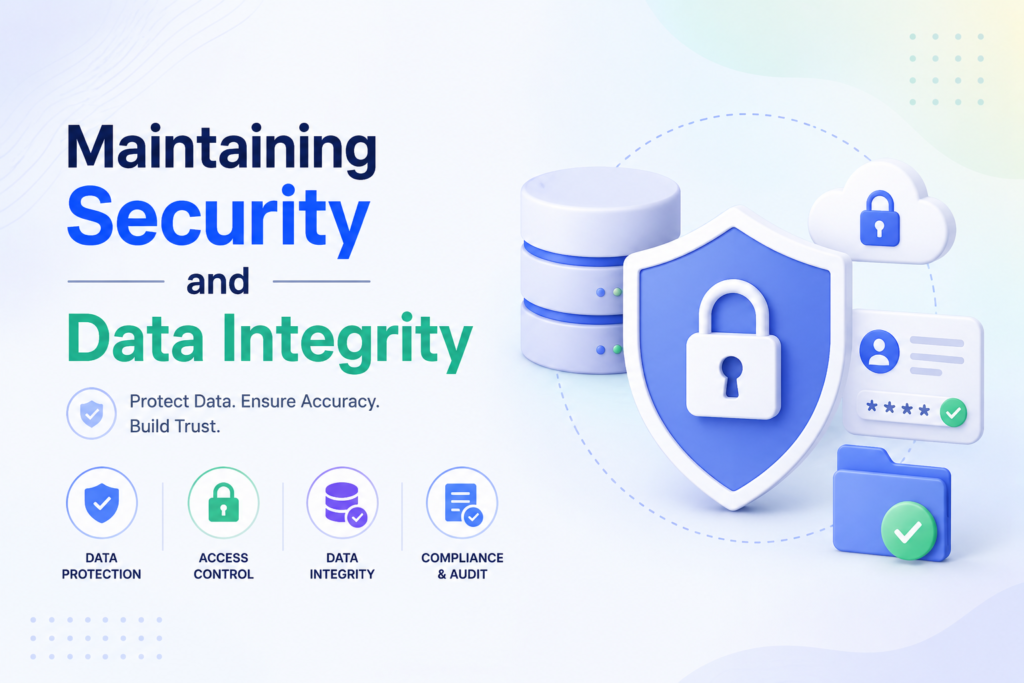
Maintaining Security and Data Integrity
Security and data integrity must remain at the forefront of your strategy as you deploy new automated workflows for automation mastery. As you integrate various platforms, your automation checklist should prioritize the protection of proprietary information and sensitive customer records. Neglecting these safeguards can lead to significant vulnerabilities that threaten your business reputation.
Establishing Access Controls and Permissions
The principle of least privilege is vital when configuring your software environment. You should ensure that every team member only has access to the specific data and tools required for their daily tasks. By limiting administrative rights, you significantly reduce the risk of accidental data breaches or unauthorized system changes.
Regularly auditing user permissions is a core component of a secure automation checklist. You must revoke access immediately when an employee leaves the company or changes roles. This proactive approach keeps your internal systems clean and secure against potential internal threats.
Ensuring Compliance with Data Privacy Regulations
Operating in the United States requires strict adherence to evolving data privacy standards. Whether you are managing customer emails or financial records, your automated systems must comply with regulations like the CCPA or industry-specific mandates. Transparency with your users regarding how their data is processed builds long-term trust.
Your automation checklist should include automated logging features to maintain a clear audit trail. These logs help you demonstrate compliance during external reviews or security assessments. Staying updated on legal requirements ensures that your growth remains sustainable and protected from regulatory penalties.
| Security Strategy | Primary Benefit | Implementation Level |
|---|---|---|
| Role-Based Access | Limits Exposure | High |
| Audit Logging | Regulatory Proof | Medium |
| Data Encryption | Prevents Theft | Critical |
| Regular Backups | Disaster Recovery | Essential |
Overcoming Common Implementation Challenges
You will likely encounter specific hurdles when you begin to implement sophisticated automation techniques across your organization. While the promise of efficiency is high, the reality of change often triggers friction among staff and technical systems alike. Navigating these obstacles requires a blend of clear communication and technical diligence.
Managing Team Resistance to New Technology
Resistance to change is a natural human response, especially when employees fear that new tools might replace their roles. You must frame these automation techniques as a way to remove tedious tasks rather than a threat to job security. By involving your team in the selection process, you foster a sense of ownership and reduce anxiety.
Consider these strategies to encourage digital adoption:
- Transparent Communication: Explain the “why” behind the shift to help staff understand the long-term benefits.
- Hands-on Training: Provide comprehensive workshops to ensure everyone feels confident using the new software.
- Early Wins: Highlight small successes early on to demonstrate how these tools make daily work easier.
Troubleshooting Integration Failures
Even with the best planning, you may face technical roadblocks when connecting different platforms. Integration failures often stem from mismatched data formats or API limitations that prevent seamless communication between systems. When these issues arise, you need a systematic approach to identify the root cause of the breakdown.
Follow this checklist to resolve common technical errors:
- Verify API Credentials: Ensure that all tokens and keys are active and have the correct permissions.
- Check Data Mapping: Confirm that fields in your CRM align perfectly with your marketing or accounting software.
- Consult Vendor Support: Reach out to technical teams early if you suspect a bug within the platform itself.
By mastering these automation techniques, you ensure that your business remains resilient against technical setbacks and closer to automation mastery. Consistent monitoring and a proactive mindset will keep your workflows running smoothly as you scale your operations.
Scale Your Business Without Limits
Access advanced automation features, AI-powered workflows, and powerful integrations designed for growth. Upgrade your plan today and build a scalable, efficient business operation.
Conclusion
Achieving operational excellence requires a commitment to continuous improvement in automation mastery. You now possess the framework to transform manual efforts into a streamlined engine for growth.
True Automation Mastery involves more than just setting up software tools like Zapier or Salesforce. It demands a mindset shift where you constantly seek ways to refine your internal operations. This approach creates a scalable foundation that supports your long-term vision.
Make it a habit to revisit your progress every quarter. Business needs change as you expand into new markets or launch fresh products. Regular audits ensure your systems remain effective and secure.
Your dedication to Automation Mastery will define your competitive edge in the marketplace. Start applying these principles today to build a resilient, efficient, and profitable organization. The future of your business depends on the smart systems you put in place right now.
FAQs
How should I begin using an automation checklist to evaluate my business operations?
You should start by documenting every repetitive manual task within your daily workflows. Use the checklist to identify areas where human intervention is redundant or causing delays. By auditing your processes with tools like Lucidchart to map out bottlenecks, you can prioritize which high-impact areas will benefit most from immediate implementation of automation techniques.
Why is automated mastery essential for businesses looking to scale rapidly?
Achieving automation mastery is a fundamental pillar for modern scalability because it eliminates the limitations of manual labor. When you automate core processes, you ensure consistent output and operational efficiency, allowing your leadership team to focus on high-level strategy rather than getting bogged down in day-to-day administrative maintenance.
What specific automation skills does my team need to develop to support this transition?
Your team needs to develop the ability to audit existing workflows, evaluate software compatibility, and troubleshoot integration failures. Developing these automation skills involves learning how to manage data flow between platforms like Salesforce and Slack, as well as understanding how to maintain data integrity and security protocols across all automated systems.
What are the most effective automation strategies for streamlining customer relationship management?
You should focus on designing automated lead nurturing sequences using platforms like HubSpot or ActiveCampaign. By delivering personalized content based on user behavior, you can increase conversion rates. Additionally, implementing an automated ticketing system through Zendesk ensures that customer inquiries are routed and addressed promptly without requiring constant manual oversight.
How can I use advanced automation techniques to connect different software in my tech stack?
To create a unified environment, you should utilize robust API integrations through middleware like Zapier or Make. These automation techniques allow disparate systems, such as your project management tool Asana and your financial software QuickBooks, to communicate in real-time, ensuring that data remains consistent and up-to-date across your entire enterprise.
How do I ensure my automated workflows remain compliant with data privacy regulations?
You must establish rigorous access controls and user permissions within your software settings to protect sensitive information. It is vital to ensure that your automated data handling processes align with global standards like GDPR or CCPA. Regularly reviewing your automation strategies for security vulnerabilities will help you maintain data integrity as your volume of customer information grows.
What is the best way to overcome team resistance to new automation technology?
You can manage resistance by clearly communicating how automation mastery benefits the individual employee. Focus on how these tools will eliminate the most frustrating, repetitive parts of their jobs, such as manual data entry or report compilation. Providing hands-on training for tools like Monday.com or Trello helps foster a culture of digital adoption and empowers your team to embrace more efficient ways of working.
Can I automate my financial and administrative reporting?
Yes, you can leverage automated reporting dashboards within Google Analytics 4 or Tableau to track Key Performance Indicators (KPIs) in real-time. By automating the compilation of financial data and administrative metrics, you provide your leadership team with actionable intelligence and predictive analysis without the need for time-consuming manual data collection.
How long does it take to achieve Automation Mastery in a business?
The timeline for achieving Automation Mastery depends on the size of your organization, the complexity of your workflows, and the tools you implement. Most businesses can automate basic processes within a few weeks, while more advanced automation projects involving multiple systems and departments may take several months. The key is to start with high-impact tasks and gradually expand your automation efforts.
What are the biggest mistakes to avoid when implementing business automation?
One of the most common mistakes is automating inefficient processes without optimizing them first. Other pitfalls include selecting tools that do not integrate well with your existing systems, failing to train employees adequately, and neglecting data security requirements. Successful Automation Mastery requires careful planning, continuous monitoring, and regular workflow audits to ensure long-term effectiveness and scalability.