
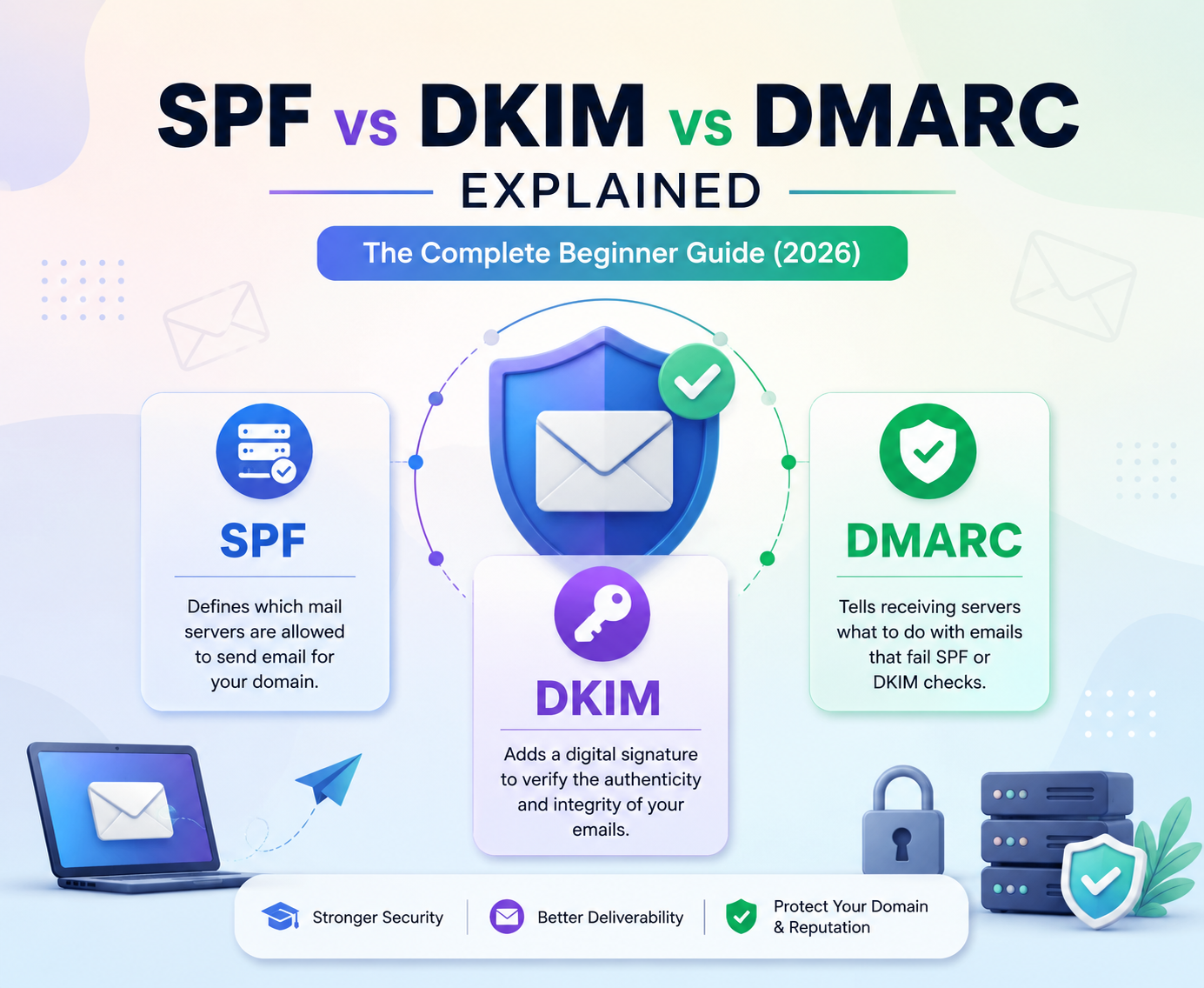





Have you ever wondered if your business emails are actually reaching your customers, or if they are being intercepted by malicious actors? In an era where digital trust is everything, failing to secure your domain can lead to devastating consequences for your brand reputation. This is why understanding SPF vs DKIM vs DMARC has become a business necessity in 2026.
Understanding the technical standards known as SPF vs DKIM vs DMARC is no longer optional for modern organizations. These three protocols act as the primary gatekeepers of your email infrastructure, ensuring that your messages remain authentic and protected from unauthorized use.
By implementing these mechanisms, you create a robust defense system that verifies your identity to receiving servers. This guide will simplify these complex concepts, helping you maintain a secure email environment while preventing spoofing attacks that could damage your professional standing.
Key Takeaways
- Email authentication is essential for protecting your domain from hackers and spoofers.
- These protocols work together to verify that your messages are legitimate.
- Proper configuration significantly improves your email deliverability rates.
- Modern security standards are mandatory for maintaining a positive sender reputation.
- You can effectively prevent unauthorized domain usage by mastering these three tools.
Protect Your Domain Before Attackers Do
Start securing your emails with automated SPF, DKIM, and DMARC monitoring. Create a free account today and identify authentication issues before they impact deliverability and reputation.
The Current State of Email Security in 2026
As cyber threats evolve, the necessity for robust security protocols has never been more critical for your business. The digital landscape of 2026 is filled with sophisticated actors who constantly seek new ways to exploit communication channels.
Implementing effective email authentication is no longer optional; it is a fundamental requirement for any organization that values its reputation. Businesses are increasingly investing in SPF vs DKIM vs DMARC to meet modern email security standards.
Why Email Authentication Matters for Your Domain
Your domain serves as the digital face of your brand. When unauthorized parties send messages on your behalf, they damage your credibility and erode the trust you have built with your customers. Proper email authentication acts as a digital passport, verifying that your messages originate from legitimate sources. The foundation of this protection lies in implementing SPF vs DKIM vs DMARC correctly.
By adopting these standards, you gain several key advantages for your infrastructure:
- Improved Deliverability: Legitimate emails are less likely to be flagged as spam by major providers.
- Brand Protection: You prevent malicious actors from successfully impersonating your team members.
- Enhanced Visibility: You gain insights into who is sending mail using your domain name.
The Rising Threat of Phishing and Spoofing
The frequency of phishing attacks has reached an all-time high in 2026. Attackers use advanced techniques to mimic the look and feel of trusted corporate communications, often tricking employees and clients into revealing sensitive data.
Without a standardized approach to email authentication, your domain remains an easy target for these deceptive practices. This is one of the biggest reasons why SPF vs DKIM vs DMARC adoption has accelerated worldwide.
Spoofing remains a primary concern for security teams worldwide. When a bad actor masks their identity to appear as a trusted sender, they bypass traditional filters that lack strict verification rules. You must prioritize the implementation of modern security frameworks to ensure that your organization does not become a vehicle for cybercrime.
What is SPF vs DKIM vs DMARC?
Building a secure email infrastructure relies on your ability to distinguish between three primary protocols. While the terms are often used interchangeably, understanding SPF vs DKIM vs DMARC is essential for any domain administrator. These tools work in harmony to verify your identity and protect your reputation.
Defining Sender Policy Framework (SPF)
SPF acts as the first line of defense by listing the specific IP addresses and servers authorized to send email on your behalf. When a message arrives, the receiving server checks your DNS records to see if the sender’s IP is on your approved list. If the IP is not listed, the email may be flagged as spam or rejected entirely.
“Security is not a product, but a process that requires constant vigilance and the right technical foundation.”
Defining DomainKeys Identified Mail (DKIM)
While SPF focuses on the server, DKIM adds a layer of cryptographic security to the email itself. It attaches a digital signature to your messages, which allows the receiver to verify that the content has not been altered during transit. By comparing SPF vs DKIM vs DMARC, you will see that DKIM is specifically designed to ensure data integrity.
Defining Domain-based Message Authentication, Reporting, and Conformance (DMARC)
DMARC serves as the orchestrator that ties the other two protocols together. It provides instructions to receiving servers on how to handle emails that fail SPF or DKIM checks. Furthermore, it offers valuable reporting features that give you visibility into who is sending mail using your domain.
Ultimately, choosing between SPF vs DKIM vs DMARC is not necessary because they are designed to function as a unified system. Implementing all three creates a robust defense that significantly reduces the risk of spoofing and phishing attacks against your organization.
To fully understand SPF vs DKIM vs DMARC, you need to examine how each protocol functions individually.
How SPF Works to Verify Your Sending Servers?
The Sender Policy Framework acts as a digital gatekeeper for your domain’s email traffic. It provides a structured way for receiving mail servers to confirm that an incoming message originated from an authorized source. By establishing this trust, you significantly reduce the chances of your domain being used for malicious spoofing.
The Role of DNS Records in SPF
SPF operates by leveraging the Domain Name System (DNS) to publish a list of authorized IP addresses. When you send an email, the receiving server performs a DNS lookup to retrieve your specific SPF record. This record is stored as a TXT record within your domain’s DNS settings.
If the IP address of the sending server matches an entry in your published record, the email passes the authentication check. If the IP is not listed, the receiving server may flag the message as suspicious or reject it entirely. This process ensures that only servers you explicitly trust can deliver mail on your behalf.
Common SPF Mechanisms and Qualifiers
Your SPF record is built using specific mechanisms that define which servers are permitted to send mail. Common mechanisms include ip4 or ip6 for direct IP addresses and include for authorizing third-party services like Google Workspace or Microsoft 365. These mechanisms are paired with qualifiers that determine how the receiving server should handle the result.
Qualifiers act as instructions for the receiving mail server. They dictate whether a match should be treated as a pass, a soft failure, or a hard rejection. Understanding these symbols is vital for maintaining a healthy email reputation. Learning SPF vs DKIM vs DMARC in detail helps administrators build a stronger email authentication strategy.
| Qualifier | Meaning | Action |
|---|---|---|
| + (Pass) | Authorized | Accept the email |
| – (Fail) | Unauthorized | Reject the email |
| ~ (Soft Fail) | Suspicious | Accept but mark as spam |
| ? (Neutral) | No policy | Treat as no authentication |
Limitations of SPF in Modern Email Delivery
While SPF is a foundational security layer, it is not a complete solution for all email threats. One major limitation is that SPF checks often fail when an email is forwarded. Because the forwarding server’s IP address is not in your original record, the authentication check may trigger a false negative.
Furthermore, SPF does not provide any form of encryption or guarantee that the message content has not been altered during transit. Because of these gaps, it is essential to pair SPF with other protocols like DKIM and DMARC.
Relying solely on SPF leaves your domain vulnerable to sophisticated attacks that bypass simple IP-based verification. The strength of SPF vs DKIM vs DMARC comes from using all three protocols together rather than relying on one method.
The Mechanics of DKIM Digital Signatures
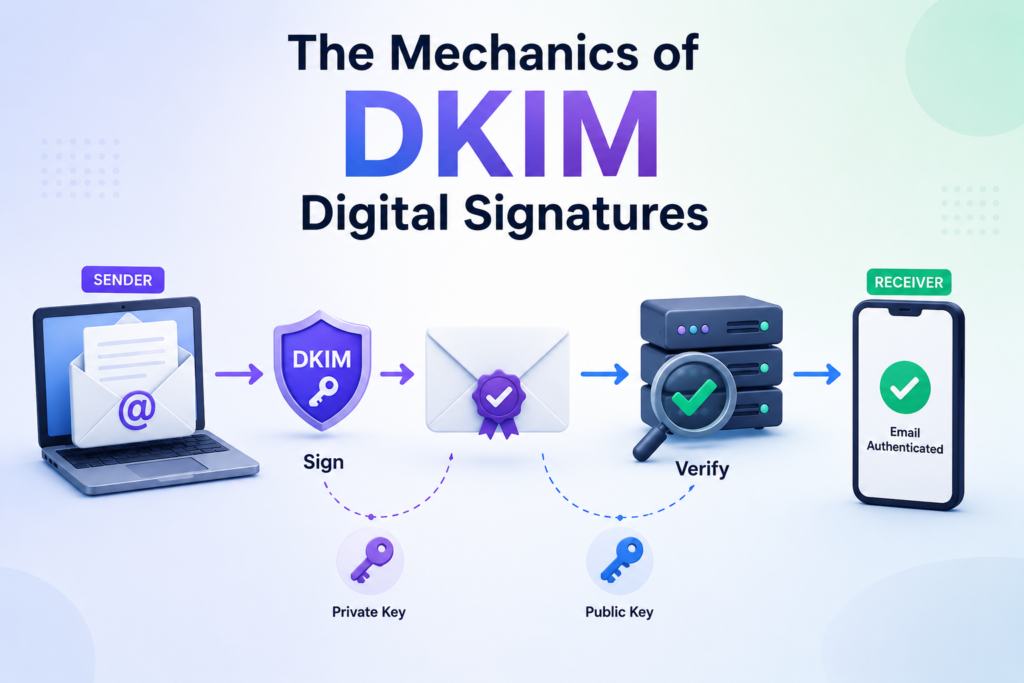
When you send an email, a complex mathematical process works behind the scenes to ensure your message arrives exactly as you wrote it. This process relies on DomainKeys Identified Mail, or DKIM, which attaches a unique digital signature to your outgoing messages. This signature acts as a virtual wax seal that confirms the message originated from your domain and has not been altered during transit.
Among SPF vs DKIM vs DMARC, DMARC serves as the policy layer that brings authentication and reporting together.
How Cryptographic Keys Validate Email Integrity
The validation process begins the moment your mail server prepares a message for delivery. Your server uses a private key to generate a hash of the email content, which is then encrypted to create the digital signature. This signature is embedded directly into the email header.
Upon receiving the message, the recipient’s server retrieves your public key from your DNS records. It uses this key to decrypt the signature and verify that the hash matches the content of the email. This mathematical verification provides absolute proof that the email content remains authentic. When comparing SPF vs DKIM vs DMARC, DKIM is the protocol responsible for protecting message integrity.
Public vs Private Key Pairs Explained
The security of this system depends on the relationship between two distinct keys. Your private key is kept strictly confidential on your sending server and is used exclusively to sign your outgoing emails.
Conversely, your public key is published in your domain’s DNS settings for the world to see. Because the public key can only decrypt what the private key has encrypted, it serves as a reliable way for receiving servers to confirm your identity without ever needing access to your private credentials.
Ensuring Your Email Content Remains Untampered
By implementing this cryptographic process, you create a secure environment for your digital communications. If a malicious actor attempts to modify your email content while it is in transit, the hash will no longer match the digital signature.
The receiving server will immediately detect this discrepancy and flag the email as suspicious. This mechanism effectively prevents spoofing and ensures that your recipients only interact with legitimate, untampered content from your domain.
The Orchestration Power of DMARC
Think of DMARC as the conductor of an orchestra, ensuring your email security protocols work in perfect harmony. While other methods verify individual parts of an email, DMARC acts as the overarching policy layer that ties everything together. It provides the necessary instructions to receiving mail servers on how to handle messages that fail authentication checks.
Set Up Email Authentication in Minutes
Stop guessing your email security configuration. Get guided SPF, DKIM, and DMARC setup tools, real-time monitoring, and actionable reports with a free account.
Aligning SPF and DKIM for Maximum Security
The true strength of DMARC lies in the concept of alignment. Alignment ensures that the domain found in the “From” header of your email matches the domains validated by your SPF and DKIM records. Without this connection, an attacker could pass authentication using their own domain while spoofing your brand name in the visible header.
By enforcing alignment, you guarantee that the identity presented to the recipient is the same identity verified by your security protocols. This creates a unified defense that is significantly harder for malicious actors to bypass. It effectively closes the loopholes that exist when SPF and DKIM are used independently.
“Email authentication is not just about preventing spam; it is about protecting the integrity of your brand identity in every digital interaction.”
DMARC Policy Options: None, Quarantine, and Reject
DMARC allows you to dictate exactly how a receiving server should treat an email that fails authentication. You can choose from three distinct policy levels based on your current security maturity. These policies provide a roadmap for moving from observation to strict enforcement.
| Policy Level | Action Taken | Best Use Case |
|---|---|---|
| None | No action, monitoring only | Initial setup and data gathering |
| Quarantine | Send to spam folder | Testing impact before full blocking |
| Reject | Block delivery entirely | Full protection for established domains |
Leveraging Aggregate and Forensic Reports
One of the most valuable features of DMARC is its ability to provide visibility into your email ecosystem. Through aggregate reports, you receive daily summaries of all traffic claiming to be from your domain. These reports help you identify legitimate services you may have forgotten to authorize.
Forensic reports offer a deeper look by providing copies of individual emails that failed authentication. This data is critical for troubleshooting and identifying specific phishing campaigns targeting your users.
By analyzing these insights, you can refine your policies and maintain a secure, high-performing email infrastructure. These reporting capabilities make SPF vs DKIM vs DMARC an essential framework for modern domain protection.
Step-by-Step Guide to Setting Up SPF
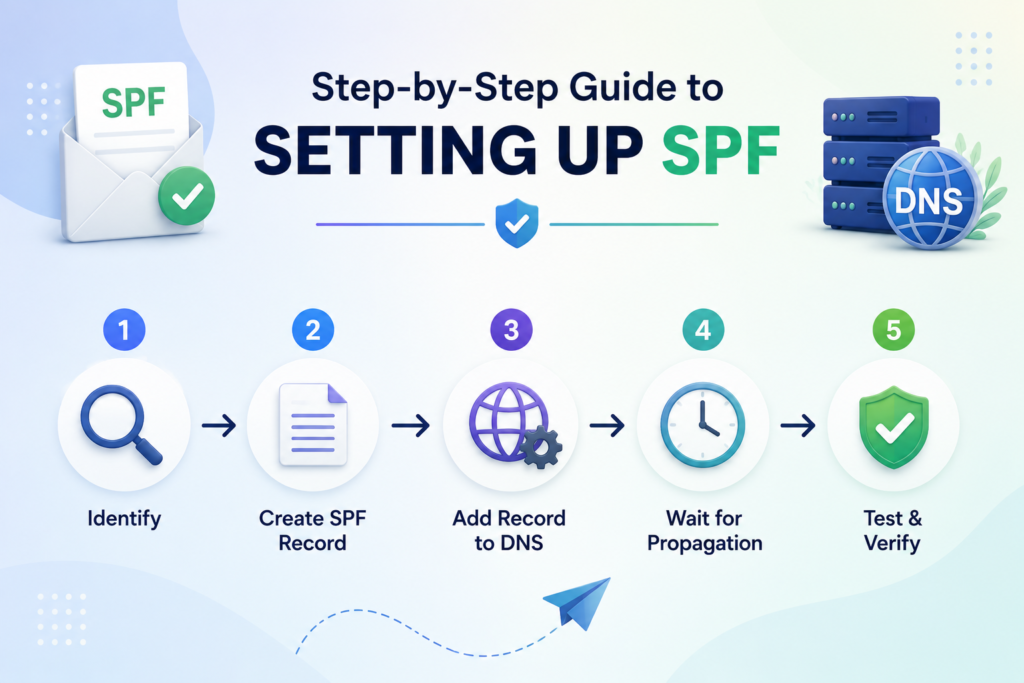
Learning how to set up spf dkim and dmarc starts with a solid foundation in the Sender Policy Framework. This protocol acts as the first line of defense by telling receiving mail servers which IP addresses are permitted to send emails on behalf of your domain. Successfully deploying SPF vs DKIM vs DMARC starts with a properly configured SPF record.
Identifying Your Authorized Sending IP Addresses
Before you write a single line of code, you must conduct a thorough audit of your email infrastructure. You need to list every service that sends mail using your domain name.
This list should include your primary email provider, such as Google Workspace or Microsoft 365, as well as any third-party marketing platforms. Do not forget to include transactional email services like SendGrid, Mailgun, or any CRM tools that trigger automated notifications.
Constructing Your SPF TXT Record
Once you have your list, you can begin building your SPF record. Every SPF record must start with the version tag v=spf1, followed by the mechanisms that define your authorized senders.
Common mechanisms include:
- ip4: Used to specify a single IP address or a range of addresses.
- include: Used to authorize third-party services by referencing their own SPF records.
- -all: The “fail” qualifier, which tells receiving servers to reject any email not explicitly listed in your record.
If you are researching how to set up spf dkim and dmarc, remember that your SPF record must remain under the 10-lookup limit to ensure it functions correctly across all receiving platforms.
Publishing the Record to Your DNS Provider
After finalizing your record, you must publish it to your domain’s DNS settings. Log in to your domain registrar or DNS hosting provider, such as Cloudflare, GoDaddy, or AWS Route 53.
Navigate to the DNS management console and create a new TXT record. Set the host field to @ or leave it blank, and paste your SPF string into the value field.
Save your changes and allow time for propagation, which can take anywhere from a few minutes to several hours. Once published, your domain will be better protected against unauthorized senders attempting to impersonate your brand.
Implementing DKIM for Your Domain
Implementing DKIM is a critical step in verifying that your messages remain authentic during transit. By attaching a digital signature to your emails, you provide receiving servers with a reliable way to confirm that the content has not been altered.
Learning how to set up spf dkim and dmarc correctly is essential for maintaining a healthy sender reputation in 2026. Many businesses begin their SPF vs DKIM vs DMARC implementation journey by securing their email signatures with DKIM.
Generating Your DKIM Key Pair
The process begins by generating a cryptographic key pair consisting of a private key and a public key. You keep the private key secure on your email server to sign outgoing messages. The public key is published in your DNS records so that receiving mail servers can retrieve it to verify your signatures.
Most modern email service providers offer a dashboard to automate this generation. You simply select your domain, and the system creates the necessary strings for you. Always ensure your private key remains confidential to prevent unauthorized parties from signing emails on your behalf.
Adding the Public Key to Your DNS Settings
Once you have your public key, you must add it to your domain’s DNS settings as a TXT record. This record typically includes a selector, which helps mail servers identify which key to use for verification. You will need to log into your domain registrar or DNS hosting provider to create this entry.
Ensure that you copy the entire string exactly as provided by your email service. Even a small typo can cause authentication failures and lead to your emails being marked as spam. After saving the record, it may take some time for the changes to propagate across the internet.
Testing Your DKIM Configuration
After publishing your record, you should verify that everything is working as expected. Use online diagnostic tools to check if your public key is correctly recognized by external servers. These tools provide immediate feedback on whether your signature is valid and properly aligned with your domain.
If you are wondering how to set up spf dkim and dmarc effectively, testing is the final piece of the puzzle. Regular audits ensure that your configuration remains intact as your infrastructure evolves. The following table highlights the core differences between these security protocols.
| Protocol | Primary Function | Verification Method |
|---|---|---|
| SPF | Authorized IP Check | DNS TXT Record |
| DKIM | Message Integrity | Cryptographic Signature |
| DMARC | Policy Enforcement | Alignment & Reporting |
Configuring DMARC Policies for Your Domain
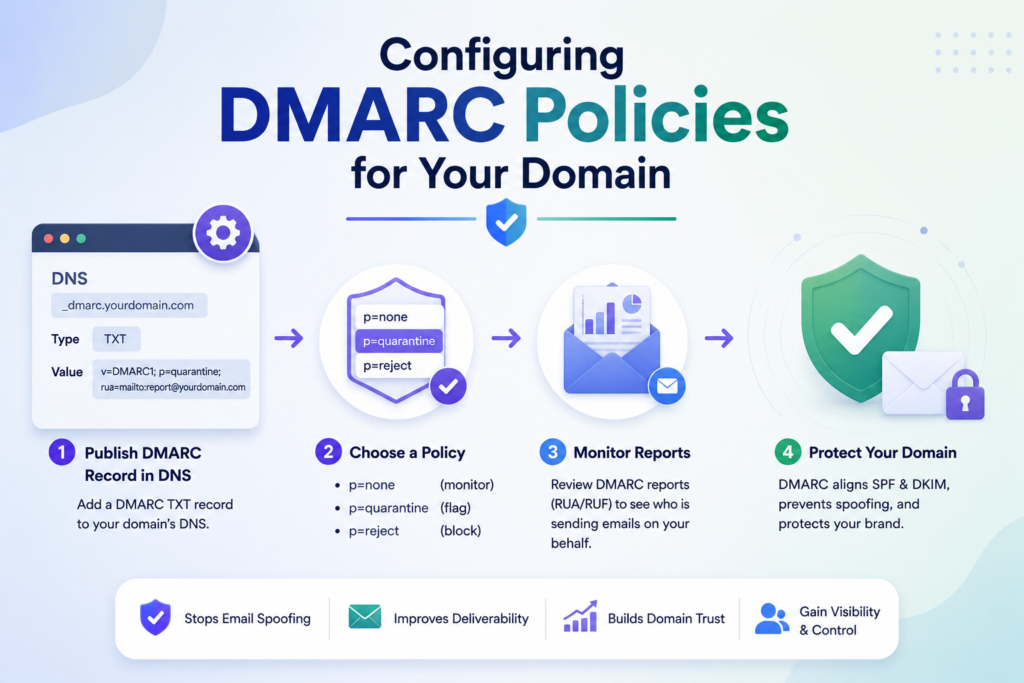
Understanding how to set up SPF, DKIM, and DMARC is essential for modern email security, starting with your DMARC record. This protocol acts as the final layer of defense, ensuring that your domain remains protected from malicious actors attempting to impersonate your brand. Completing your SPF vs DKIM vs DMARC setup with DMARC gives you visibility and enforcement capabilities.
Creating Your DMARC TXT Record
To begin, you must publish a specific TXT record in your domain’s DNS settings. This record is always placed under a subdomain named _dmarc. For example, if your domain is example.com, your record will be located at _dmarc.example.com.
The record itself contains tags that define your security instructions. The most critical tag is the p tag, which dictates the policy for your domain. You should also include a rua tag to specify an email address where you want to receive aggregate security reports.
Choosing the Right Policy for Your Current Needs
When you first deploy DMARC, it is best to start with a “none” policy. This setting allows you to monitor your email traffic without blocking any messages. It provides a safe way to gather data and identify legitimate senders before you move to stricter enforcement.
Once you are confident that your legitimate email streams are properly authenticated, you can transition to more restrictive policies. The “quarantine” policy sends suspicious emails to the recipient’s spam folder, while the “reject” policy blocks them entirely. This progression ensures that you do not accidentally disrupt your own business communications.
| Policy Level | Action Taken | Recommended Use |
|---|---|---|
| p=none | Monitor only | Initial setup phase |
| p=quarantine | Send to spam | Testing phase |
| p=reject | Block delivery | Full enforcement |
Monitoring Reports to Identify Unauthorized Senders
After publishing your record, you will begin receiving aggregate reports from major mailbox providers. These reports provide a clear view of which servers are sending mail on your behalf. By analyzing this data, you can easily see if unauthorized services are attempting to use your domain.
Learning how to set up SPF, DKIM, and DMARC is a continuous process that relies on these insights. If you notice legitimate services failing authentication, you can adjust your records before moving to a stricter policy. This proactive approach keeps your domain reputation high and your email delivery rates stable.
Common Pitfalls When Configuring Email Authentication
Even experienced administrators frequently encounter hurdles when implementing SPF vs DKIM vs DMARC. While these protocols are essential for protecting your domain, the configuration process requires precision to avoid unintended consequences. Understanding these common traps will help you maintain a healthy sender reputation.
Avoiding SPF Record Length Limits
One of the most frequent issues you will face is the 255-character limit for a single DNS TXT record. Furthermore, the SPF specification limits you to a maximum of 10 DNS lookups per check. If you exceed these thresholds, your authentication will fail, and your emails may be rejected by receiving servers.
To solve this, you should flatten your SPF records by replacing domain names with their corresponding IP addresses. You can also use subdomains to delegate specific services, which helps keep your primary domain’s record clean and efficient. Always verify your record size using online tools before publishing changes to your DNS provider.
Managing Multiple Third-Party Email Services
Modern businesses often rely on various platforms like MailerRocket, Salesforce, and Mailchimp to send emails on their behalf. Managing these services requires a centralized approach to avoid record bloat. If you simply append every new service to your SPF record, you will quickly hit the lookup limit mentioned earlier.
Instead of adding every service to your SPF, prioritize using DKIM for these third-party senders. Since DKIM signatures are attached to the email content itself, they do not count toward your SPF lookup limit. This strategy allows you to scale your email infrastructure without compromising your security posture.
“Email authentication is not a set-it-and-forget-it task; it is a continuous process of monitoring and refinement to ensure your legitimate traffic is always trusted.”
Troubleshooting Delivery Failures After Implementation
If you notice a sudden drop in deliverability after applying your policies, do not panic. The first step is to check your DMARC aggregate reports to see if legitimate emails are being flagged as unauthorized. These reports provide the visibility you need to identify which services are failing authentication.
Proper monitoring of SPF vs DKIM vs DMARC configurations can quickly resolve deliverability issues before they impact your business. You should also ensure that your DNS propagation is complete, as changes can take up to 48 hours to take effect globally. Use the following table to identify and resolve common configuration errors quickly.
| Error Type | Common Cause | Recommended Fix |
|---|---|---|
| SPF PermError | Exceeding 10 DNS lookups | Flatten records or use DKIM |
| DKIM Fail | Incorrect public key in DNS | Re-copy key and check for typos |
| DMARC Reject | Policy set too strictly | Change to ‘quarantine’ temporarily |
| Alignment Fail | Header domain mismatch | Update your sending domain settings |
By systematically addressing these pitfalls, you can ensure that your email authentication remains robust. Consistent monitoring is the key to long-term success in protecting your domain from spoofing and phishing attempts.
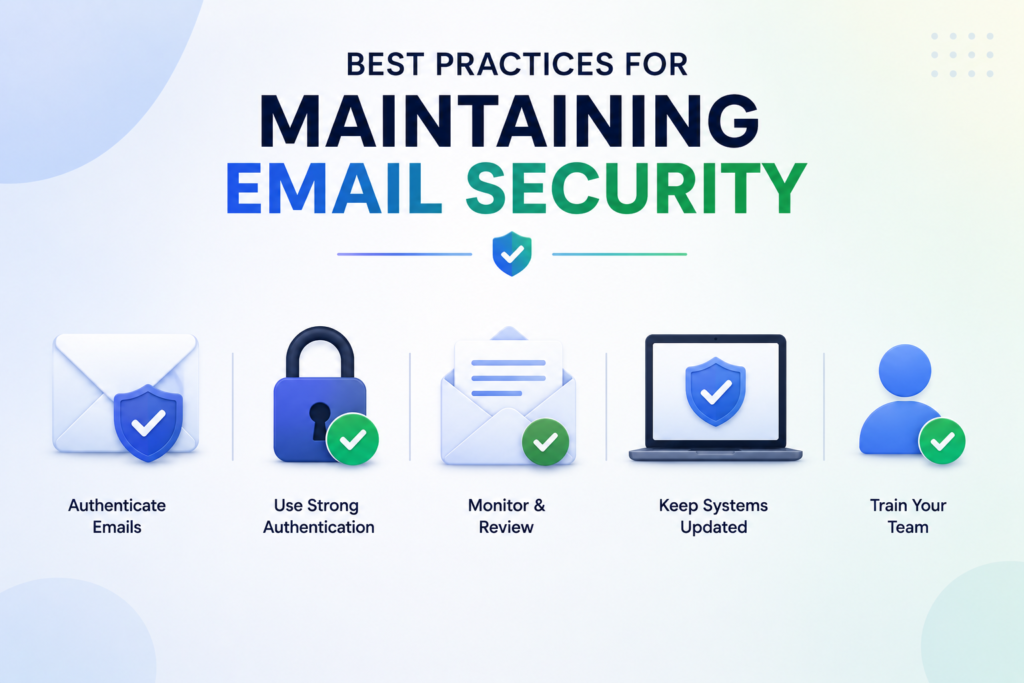
Best Practices for Maintaining Email Security
Maintaining robust email security requires more than a one-time configuration. While your initial setup provides a solid foundation, the digital landscape changes rapidly, and your defenses must adapt accordingly.
Consistent oversight ensures that your domain remains protected against advanced cyber threats. Regular audits ensure your SPF vs DKIM vs DMARC configuration remains effective as your infrastructure evolves.
Regularly Auditing Your Authentication Records
You should establish a recurring schedule to review your DNS records. Periodic audits allow you to verify that your email authentication settings remain accurate and effective. By checking these records quarterly, you can quickly spot discrepancies or unauthorized changes that might compromise your deliverability.
During these audits, analyze your DMARC reports to identify any unexpected traffic. If you notice legitimate services being flagged, you can adjust your policies before they impact your business operations. Staying proactive with your email authentication helps you maintain a clean reputation with major mailbox providers.
Updating Policies as Your Email Infrastructure Evolves
Your business needs will naturally shift as you adopt new marketing tools or cloud-based services. Every time you integrate a new third-party sender, you must update your SPF and DKIM records to include these new sources. Failing to do so often leads to sudden delivery failures that can disrupt your communication flow.
Treat your security policy as a living document that scales alongside your organization. When you retire an old service, remove its associated keys and IP addresses immediately to minimize your attack surface. Proper management of your email authentication ensures that only authorized senders can represent your brand.
| Maintenance Task | Frequency | Primary Goal |
|---|---|---|
| DNS Record Audit | Quarterly | Verify accuracy |
| DMARC Report Review | Monthly | Identify threats |
| Provider Updates | As needed | Maintain flow |
| Policy Refinement | Bi-annually | Enhance security |
Ready for Complete Email Protection?
Upgrade to advanced email security with automated enforcement, detailed DMARC reports, and continuous monitoring to protect your brand from phishing and spoofing attacks.
Conclusion
Protecting your domain requires a proactive stance against evolving cyber threats. SPF, DKIM, and DMARC serve as the bedrock for modern email authentication in 2026. Mastering SPF vs DKIM vs DMARC is one of the most important steps you can take to protect your domain and improve email deliverability.
You now possess the knowledge to build a robust defense for your outgoing messages. A layered approach ensures that your brand reputation remains intact while your emails reach the intended inboxes.
Take the initiative to audit your DNS records today. Small adjustments to your security configuration prevent unauthorized actors from exploiting your domain name.
Reliable communication builds trust with your customers and partners. By prioritizing these protocols, you demonstrate a commitment to digital safety and professional standards.
Start your implementation process now to stay ahead of malicious spoofing attempts. Your proactive efforts today create a safer digital environment for everyone involved in your network.
FAQs
What is the fundamental difference when comparing SPF vs DKIM vs DMARC?
The core difference lies in their specific functions within the email authentication process. SPF (Sender Policy Framework) acts as an authorized sender list by identifying which IP addresses are allowed to send mail for your domain. DKIM (DomainKeys Identified Mail) provides a digital signature that guarantees the email content has not been altered in transit. Finally, DMARC (Domain-based Message Authentication, Reporting, and Conformance) serves as the management layer, telling receiving servers like Gmail or Outlook what to do if an email fails SPF or DKIM checks.
How to set up SPF, DKIM and DMARC for my organization?
To begin, you must access your DNS management platform, such as Cloudflare, GoDaddy, or Amazon Route 53. First, create an SPF TXT record that lists your authorized mail servers, such as Microsoft 365 or Google Workspace. Next, generate a DKIM public/private key pair within your email service provider’s admin console and publish the public key as a DNS record. Lastly, implement a DMARC TXT record that defines your policy and specifies where you would like to receive aggregate and forensic reports for monitoring.
Why is the transition from SPF vs DKIM vs DMARC monitoring to enforcement so important in 2026?
In the current security landscape, simply having records is not enough. Moving your DMARC policy from “none” to “quarantine” or “reject” is the only way to actively prevent malicious actors from spoofing your domain. Major providers like Yahoo and Google now require robust email authentication for bulk senders to ensure that phishing attempts are blocked before they ever reach a user’s inbox, thereby protecting your brand’s reputation.
Can I use more than one SPF record, and how does this affect SPF vs DKIM vs DMARC alignment?
No, you should never have more than one SPF record for a single domain; having multiple records will cause authentication to fail. Instead, you must consolidate all authorized services, such as Salesforce, Zendesk, and SendGrid into a single SPF string. Proper consolidation is vital for DMARC alignment, as it ensures the “From” header seen by the recipient matches the domain validated by your SPF and DKIM records.
What are the common pitfalls to avoid when managing email authentication?
One of the most frequent errors is exceeding the SPF 10-lookup limit, which occurs when you include too many third-party vendors in your record. Another common mistake is failing to rotate your DKIM keys, which can leave your signatures vulnerable to cryptographic attacks. To avoid these issues, regularly audit your DNS records and use DMARC reporting tools to identify and fix delivery failures before they impact your primary communication channels. Regular reviews of your SPF vs DKIM vs DMARC setup help ensure that your domain remains secure and compliant with industry standards.
How does DKIM ensure the integrity of my emails during transmission?
DKIM uses a pair of cryptographic keys: a private key held by your sending server and a public key published in your DNS. When you send an email via a service like Mailchimp or HubSpot, the server signs the message header and body with the private key. The receiving server then retrieves your public key to verify the signature. If the content was modified by a “man-in-the-middle” during delivery, the signature will not match, and the authentication will fail.
What is the best strategy for choosing a DMARC policy for a new domain?
The industry standard is to start with a “p=none” policy. This “monitoring mode” allows you to collect data and receive reports without affecting your current email delivery. After analyzing these reports to ensure all legitimate mail from sources like Microsoft 365 or Adobe Express is passing authentication, you should gradually move to “p=quarantine” (sending suspicious mail to spam) and finally “p=reject” (blocking unauthorized mail entirely).
Does SPF vs DKIM vs DMARC improve email deliverability?
Yes, implementing SPF vs DKIM vs DMARC correctly can significantly improve your email deliverability. Major email providers like Gmail, Outlook, and Yahoo use these authentication protocols to determine whether your messages are trustworthy. Properly configured authentication reduces the chances of your emails being marked as spam and helps maintain a strong sender reputation.
Do small businesses need SPF vs DKIM vs DMARC?
Absolutely. Cybercriminals frequently target small businesses because they often lack advanced security measures. Implementing SPF vs DKIM vs DMARC protects your domain from spoofing and phishing attacks, improves customer trust, and ensures that your legitimate emails reach recipients’ inboxes. Email authentication is essential regardless of your company’s size.
How long does it take for SPF vs DKIM vs DMARC changes to take effect?
Most DNS changes for SPF vs DKIM vs DMARC records begin propagating within a few minutes, but full global propagation can take up to 24 to 48 hours depending on your DNS provider’s settings and cache duration. During this period, you should monitor your authentication reports and test your configuration to ensure that your email traffic is functioning correctly.