






Have you ever wondered why your message does not appear in a recipient’s inbox the exact millisecond you press the button? Most people assume that hitting send triggers an instantaneous arrival, but the reality is far more complex.
Understanding the email queue vs email delivery process is vital for anyone managing digital communications. When you send a note, it enters a temporary holding area before moving through various servers. This journey involves multiple stages, including server acceptance and final placement.
It is a common misconception that a successful transmission signal means your contact has already read your words. In truth, a server confirmation only proves that the message was accepted for processing. True success requires navigating through spam filters and reaching the intended destination successfully.
Key Takeaways
- Clicking send initiates a multi-stage technical journey rather than an instant arrival.
- A temporary holding area manages traffic before messages reach their final destination.
- Server acceptance signals do not guarantee that a recipient has seen your message.
- Inbox placement depends on passing through various security and spam filters.
- Engagement metrics are separate from the initial technical transmission process.
Understand Your Email Delivery
Stop guessing what happens after you click send. Learn how queues, SMTP handoffs, authentication, and inbox placement work together to improve email delivery and reliability.
What Happens the Moment You Click Send
The email queue vs email delivery process begins the moment you finalize your message, but the complete email sending process is far more intricate than a simple click suggests. When you finalize your message and hit the button, your device immediately begins a series of automated technical operations. These steps ensure your data is formatted correctly for the vast network of servers it must traverse.
How Your Email Client Packages the Message
Your email application acts as a digital architect. It gathers your message body, subject line, and recipient addresses into a standardized format. It also attaches any files and applies specific encoding, such as MIME, to ensure the content remains readable across different platforms.
This initial preparation is an important part of the email queue vs email delivery process because the message must be correctly formatted before it can move forward. Proper packaging is essential for successful transmission. Without these headers and encoding standards, the receiving server would not know how to interpret your message or display your attachments correctly.
Why “Sent” Does Not Mean “Delivered”
Many users mistakenly believe that a “Sent” status confirms the recipient has received the email. In reality, this status only indicates that your device has successfully handed off the message to your outgoing mail server. The email is now in the hands of the service provider, which must still route it through the internet.
The journey from your outbox to the recipient’s inbox involves multiple handshakes between servers. A “Sent” notification is simply the first milestone in this complex journey. This distinction is at the heart of email queue vs email delivery, because a sent message can still be waiting for processing or routing.
The Difference Between Local Processing and Server Processing
The email queue vs email delivery distinction becomes clearer when you separate activity on your device from processing performed by mail servers. Local processing involves your app preparing the message and storing it in an outbox. If you are offline, the message stays on your device until a connection is restored.
Server processing begins only after the message leaves your device. Once the server receives the data, it takes over the responsibility of routing and delivery. The following table highlights the key differences in these stages:
| Stage | Location | Primary Action |
|---|---|---|
| Local Processing | Your Device | Formatting and queuing |
| Handoff | Network Interface | Transfer to SMTP server |
| Server Processing | Mail Server | Routing and delivery |
| Final Arrival | Recipient Server | Inbox placement |
Email Queue vs Email Delivery: The Difference Between Waiting and Arriving
To master your digital communication, you must first grasp the fundamental difference between an email queue vs email delivery. While these terms are often used interchangeably in casual conversation, they represent two distinct stages in the lifecycle of your message.
What an Email Queue Actually Means
An email queue acts as a controlled holding area for your messages and is one of the most important parts of understanding email queue vs email delivery. When your system cannot send an email immediately, it places the message in this temporary storage buffer.
This process ensures that your outgoing traffic remains organized and manageable. By holding messages, the system prevents server overload and allows for orderly processing, routing, or retries if a connection fails.
What Email Delivery Actually Confirms
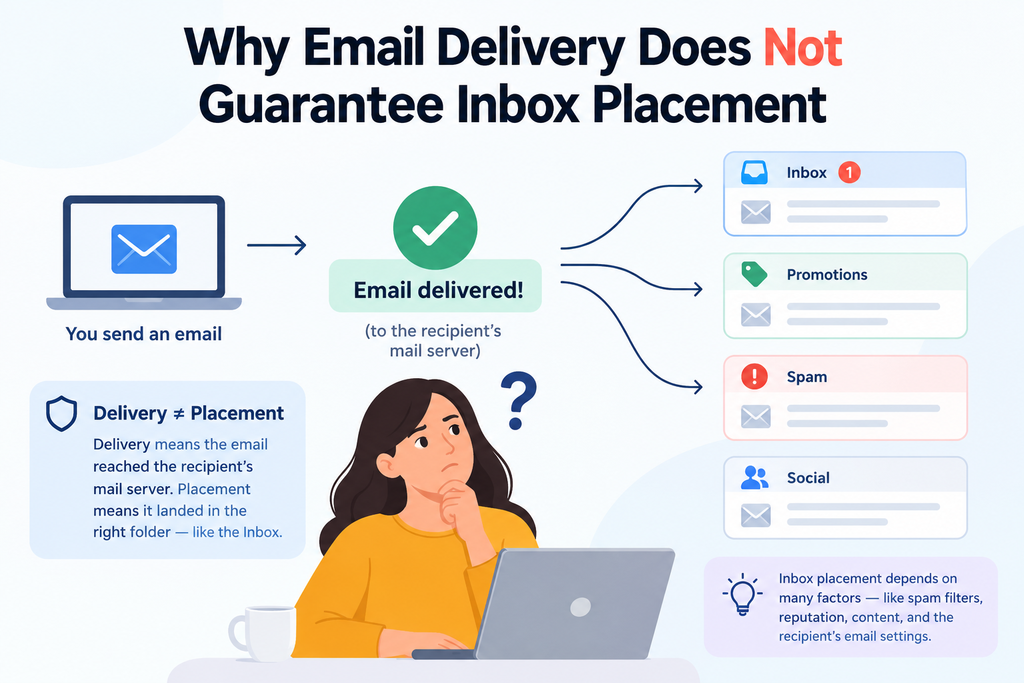
Many people mistakenly believe that delivery equals inbox placement. In reality, delivery simply confirms that the recipient’s mail server has accepted your message. This is another important point when comparing email queue vs email delivery: queueing describes waiting and processing, while delivery describes acceptance by the destination server.
Once the receiving server acknowledges receipt, the technical delivery phase is complete. This status does not guarantee that the email will bypass spam filters or reach the primary inbox folder. This distinction is important when evaluating email queue vs email delivery, since server acceptance does not necessarily mean the message has reached the recipient’s inbox.
Why Queued, Sent, Delivered, and Opened Are Separate Events
Understanding the timeline of your message is vital for troubleshooting. These events occur in a specific, non-simultaneous sequence that reflects the path your data takes across the internet. Understanding email queue vs email delivery helps explain why these status changes should not be treated as the same event.
Accepted by the Sending Server
The process begins when your local client or application hands the message to your sending server. At this point, the server validates your credentials and prepares the email for its journey. This handoff represents an early stage in email queue vs email delivery, rather than confirmation that the message has reached the recipient.
Accepted by the Recipient’s Mail Server
After the message leaves your server, it travels to the destination. The recipient’s server then performs its own security checks before accepting the data. Only after this handshake is the email considered delivered, which is a separate milestone from the eventual opened event that occurs when a human finally reads your content.
This step demonstrates the practical difference between email queue vs email delivery, as acceptance by the recipient server marks delivery rather than simply queueing.
How Your Email Moves Through the Sending System
Every time you hit send, a sophisticated sequence of validation and authentication protocols begins. This complex email sending process ensures that your message is legitimate, safe, and ready for transit across the internet.
Message Validation Before Queuing
Before your message enters the queue, the system performs a series of preliminary checks. It verifies that the recipient’s address follows the correct syntax and that the sender has the necessary permissions to initiate the transfer. These preliminary checks are an important part of the email queue vs email delivery lifecycle because they determine whether a message is ready to enter the outbound queue.
If the system detects an invalid address or a malformed header, it will stop the message immediately. This prevents wasted resources and ensures that only valid traffic moves forward in the email sending process.
Authentication Checks Using SPF, DKIM, and DMARC
Once the message is validated, it must prove its identity through three primary security layers. These protocols work together to prevent spoofing and ensure that your domain remains trustworthy. These authentication checks influence the email queue vs email delivery journey by helping receiving systems determine whether incoming messages can be trusted.
- SPF (Sender Policy Framework): Identifies which mail servers are authorized to send email on behalf of your domain.
- DKIM (DomainKeys Identified Mail): Adds a cryptographic signature to your email, verifying that the content has not been altered.
- DMARC (Domain-based Message Authentication, Reporting, and Conformance): Uses SPF and DKIM to provide instructions to the receiving server on how to handle messages that fail authentication.
| Protocol | Primary Function | Security Benefit |
|---|---|---|
| SPF | IP Authorization | Prevents unauthorized server usage |
| DKIM | Content Integrity | Ensures message remains unchanged |
| DMARC | Policy Enforcement | Aligns protocols for better filtering |
How Sender Reputation Influences Processing Priority
Your sender reputation acts as a digital credit score that influences how quickly your messages are processed. Servers often prioritize traffic from domains with a history of high engagement and low bounce rates. For this reason, sender reputation can affect different stages of email queue vs email delivery, particularly when providers apply throttling or additional filtering.
If your reputation is low, the system may apply throttling to your outgoing mail. This slows down the email sending process to prevent potential spam from overwhelming the receiving infrastructure. Maintaining a positive reputation is essential for ensuring your messages reach the inbox without unnecessary delays.
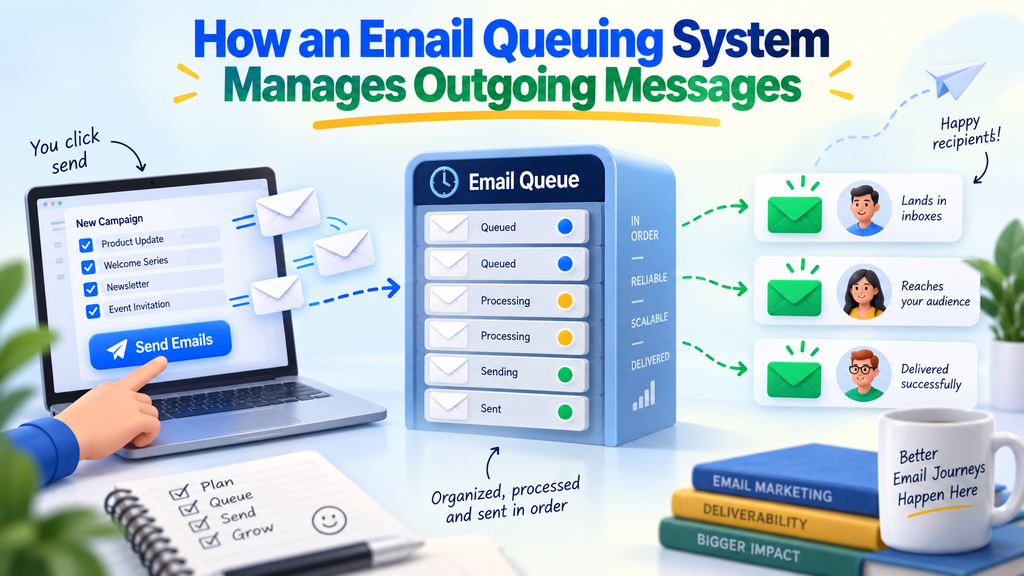
How an Email Queuing System Manages Outgoing Messages
An effective email queuing system is central to email queue vs email delivery because it acts as a traffic controller for your digital communications. By holding messages in a structured buffer, providers can manage the flow of data to prevent system crashes and ensure that every email reaches its destination efficiently.
Why Email Services Place Messages in a Queue
Email services utilize queues to protect their infrastructure from sudden surges in traffic. When you send a large volume of messages, the system does not attempt to push them all at once. Instead, it holds them to maintain a steady, manageable pace that prevents server overload. This controlled approach helps explain the practical difference between email queue vs email delivery when large volumes of messages are being processed.
This process also allows for automatic retries. If a recipient’s server is temporarily unavailable, the system keeps the message in the queue and attempts to deliver it again later. This ensures that your important communications are not lost due to minor network hiccups.
How Queue Priority, Volume, and Rate Limits Affect Timing
The speed at which your email travels depends on the specific rules set by your email queue service. High-volume senders often face strict rate limits to ensure fair usage across the network. When your outbound volume exceeds the available delivery capacity, you will notice an increase in latency. This is another practical example of email queue vs email delivery, where queue conditions can affect how quickly a message progresses toward delivery.
Prioritization logic determines which messages leave the queue first. By assigning different levels of importance to your emails, the system ensures that time-sensitive data is processed before bulk marketing materials.
Temporary Storage During Traffic Spikes and Service Delays
During unexpected traffic spikes, the system acts as a shock absorber. It provides temporary storage for your messages, preventing them from being rejected by the receiving server. This buffer ensures that even during peak hours, your emails remain safe until they can be processed. This temporary buffer is a key part of email queue vs email delivery, allowing messages to remain available until the system can attempt transmission.
Transactional Email Queues
These queues are designed for high-priority messages that require immediate delivery. Examples include password resets, order receipts, and security alerts. Because these emails are critical to the user experience, they are typically moved to the front of the line.
Marketing and Bulk Email Queues
Marketing campaigns often involve thousands of recipients at once. To prevent these large batches from clogging the system, they are placed in separate queues with stricter rate limits. This approach protects your sender reputation by ensuring that bulk mail does not interfere with urgent communications.
Internal Business Email Queues
Internal communications often follow a standard flow within an organization. These queues balance the need for speed with the overall volume of daily business operations. They ensure that team updates and project notifications are delivered reliably without impacting external customer-facing traffic.
This separation makes the email queue vs email delivery process easier to manage by keeping different types of messages organized according to their delivery needs.
| Queue Type | Priority Level | Typical Volume | Primary Goal |
|---|---|---|---|
| Transactional | Highest | Low to Medium | Immediate Delivery |
| Internal | Medium | Moderate | Reliable Flow |
| Marketing | Lowest | High | Throughput Control |
How Routing and SMTP Hand Off Your Message
Routing your email effectively depends on the invisible infrastructure that connects global mail servers. Once your message is ready to leave your local environment, it enters the world of SMTP email routing to find its way across the internet.
The routing stage is where the distinction between email queue vs email delivery becomes especially important, because a message must leave the queue before the destination server can accept it.
Finding the Recipient’s Mail Server Through DNS and MX Records
Before any data transfer occurs, your sending server must locate the destination. It performs a Domain Name System (DNS) lookup to identify the specific mail servers responsible for the recipient’s domain.
This process relies on MX records, which act as a directory for incoming mail. These records tell your server exactly where to send the message to ensure it reaches the correct destination.
What Happens During the SMTP Conversation
Once the destination server is identified, a structured conversation begins between the two systems. This exchange follows a strict set of commands to verify the sender and the recipient. Understanding this exchange is essential when analyzing email queue vs email delivery, because SMTP communication connects the queued message with the receiving mail server.
- EHLO: The sending server introduces itself to the receiving server.
- MAIL FROM: The sender identifies the origin address of the email.
- RCPT TO: The sender specifies the intended recipient.
- DATA: The actual content of the email is transmitted.
Why the Recipient’s Server Can Accept, Defer, or Reject a Message
The receiving server acts as a gatekeeper, evaluating every incoming message based on security policies and current traffic levels. It will provide an SMTP delivery status code to inform your server of the outcome.
SMTP Success Codes and Temporary Responses
A 250 response code is the gold standard, confirming that the server has successfully accepted your message. However, you may occasionally encounter 4xx codes, which indicate a temporary issue. Understanding these response codes makes email queue vs email delivery easier to troubleshoot because they show whether the message was accepted, delayed, or rejected.
| Code Type | Meaning | Action |
|---|---|---|
| 250 | Success | Message accepted |
| 4xx | Temporary | Retry later |
| 5xx | Permanent | Stop sending |
Permanent Failures and Bounce Responses
When a server returns a 5xx response, it signifies a permanent failure. This often happens if the recipient address does not exist or if the domain is misconfigured.
In these cases, the server will not attempt to deliver the message again. You should treat these as hard bounces and remove the invalid addresses from your mailing list to protect your sender reputation. Tracking these outcomes helps clarify the difference between email queue vs email delivery and shows where a message ultimately stops in the sending process.
Why Email Delivery Does Not Guarantee Inbox Placement
You might be surprised to learn that your email can be delivered successfully and still never reach the primary inbox. While your email service provider may confirm that the message reached the recipient’s server, this is only the first step in a complex journey. True success depends on whether the message actually appears before the eyes of your subscriber.
The Difference Between Delivery, Inbox Placement, and Engagement
It is important to distinguish between these three distinct stages. Email delivery simply means the receiving server accepted your message without bouncing it back. Inbox placement refers to the specific folder where the email lands, such as the Primary, Promotions, or Spam folder. The distinction between these milestones is central to email queue vs email delivery, because technical delivery does not automatically mean inbox placement or engagement.
Engagement is the final hurdle, representing whether the recipient actually opens or interacts with your content. Following email delivery best practices helps ensure your messages are not just accepted, but also welcomed by the end user.
How Spam Filters Evaluate a Delivered Message
Modern spam filtering systems are incredibly sophisticated and continue to analyze your email even after it has been accepted by the server. These filters look for patterns that suggest unsolicited or malicious activity. They weigh your sender history against current global trends to determine the final destination of your message.
“Deliverability is not a destination; it is a continuous process of building trust with both the mailbox providers and your subscribers.”
Reasons a Delivered Email Can Reach Spam, Promotions, or Other Folders
Even if your technical setup is perfect, your email might still be diverted to secondary folders. Providers like Gmail or Outlook use complex algorithms to categorize incoming mail based on user behavior and content signals. This is why email queue vs email delivery should be considered separately from inbox placement, which happens after the receiving server accepts the message.
Sender Reputation and Complaint Rates
Your sender reputation is the foundation of your deliverability. If a high percentage of recipients mark your emails as spam, providers will quickly downgrade your standing. Maintaining a low complaint rate is essential to keep your messages landing in the primary inbox.
Message Content, Links, and Attachments
The actual content of your email plays a massive role in how filters classify it. Using excessive promotional language, broken links, or suspicious attachments can trigger automated flags. Always ensure your content provides genuine value to avoid being filtered out.
Recipient-Specific Filtering Rules
Finally, remember that individual users often set their own rules. If a recipient has previously moved your emails to a specific folder, the provider will likely continue that behavior for future messages. Personalization and relevant content are the best ways to encourage users to keep your emails in their primary view.
What Email Status Updates Really Tell You
When you send an email, the status labels you see provide a window into the complex journey of your message. These indicators are essential for effective email queue management, as they help you identify where a message currently resides in the delivery pipeline. Knowing the difference between email queue vs email delivery makes these status indicators much easier to interpret.
Optimize Your Email Queue
Manage sending rates, retries, priorities, and temporary failures more effectively. Build a reliable email queuing system that keeps traffic controlled and messages moving smoothly.
Queued, Processing, and Sending Statuses
A “Queued” status indicates that your message is waiting in a buffer before it is transmitted. This often happens when your system is managing high volumes of traffic or adhering to specific rate limits. Once the system begins the transmission process, the status shifts to “Processing” or “Sending,” meaning the message is actively moving toward the recipient’s mail server.
These changing statuses provide a practical view of email queue vs email delivery, showing how a message progresses from waiting to active transmission.
Delivered, Deferred, Bounced, and Failed Statuses
Understanding the final outcome of your message is vital for maintaining a healthy sender reputation. A “Delivered” status confirms that the receiving server accepted the email, while a “Deferred” status means the server temporarily delayed the message, often due to traffic spikes.
Conversely, a “Bounced” status signals a permanent failure, requiring you to remove that address from your list. Reading these statuses correctly makes email queue vs email delivery easier to understand and helps identify whether a message is waiting, accepted, delayed, or permanently rejected.
The following table outlines how these common status labels function within your dashboard:
| Status | Meaning | Action Required |
|---|---|---|
| Queued | Waiting in buffer | None (Automatic) |
| Deferred | Temporarily delayed | Monitor for retry |
| Bounced | Permanent failure | Remove from list |
Why Status Dashboards Can Lag Behind Actual Events
You may notice that your email status updates do not always reflect real-time events. This delay occurs because data must travel through various reporting systems, webhooks, and tracking pixels before appearing on your screen.
These pipelines prioritize actual delivery over immediate dashboard synchronization. This reporting delay can make email queue vs email delivery appear confusing when the dashboard status does not immediately match the actual server-side event.
Delivery Receipts and Their Limitations
Many users rely on delivery receipts to confirm that a message reached its destination. However, these receipts only confirm that the receiving server accepted the email, not that it reached the user’s inbox.
They do not account for spam filters or internal routing rules that might hide the message from the recipient. For this reason, email queue vs email delivery should not be used as a measure of whether the recipient has actually seen the message.
Open and Click Tracking Versus Confirmed Delivery
It is important to distinguish between technical delivery and actual engagement. While delivery confirms the server handshake, open and click tracking provide insights into user behavior. You should consider the following factors when analyzing your metrics:
- Delivery: Confirms the server accepted the message.
- Open Tracking: Relies on invisible pixels to detect when a user views the content.
- Click Tracking: Monitors interactions with links within the email body.
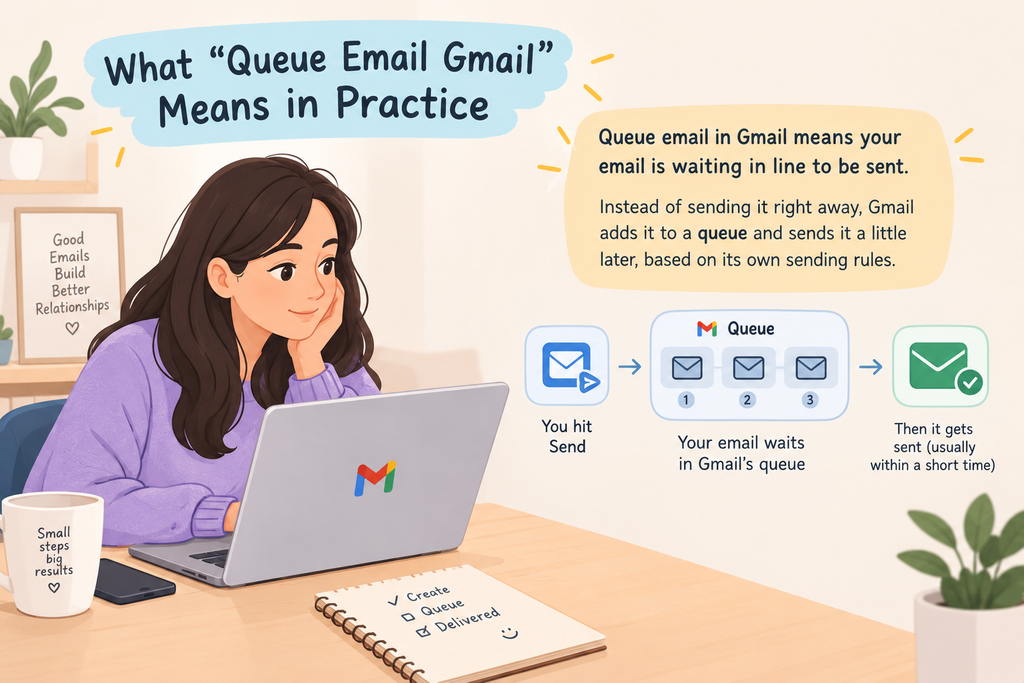
What “Queue Email Gmail” Means in Practice
Understanding the mechanics behind a gmail queued email helps you resolve delivery delays quickly. When your message fails to leave your device immediately, it enters a temporary holding state known as the queue. This process acts as a safety net, ensuring your data is not lost during brief technical interruptions.
Why Gmail May Show an Email as Queued
A message typically enters the queue when the application cannot establish a stable connection to Google’s servers. This often happens if your device is in airplane mode or has a weak cellular signal. The system holds the email locally until it can successfully handshake with the outgoing mail server.
Common Gmail Queue Causes, Including Connectivity and Attachments
Beyond simple connectivity, several factors can trigger a queue email gmail status. Large attachments often exceed the data limits allowed by your current network connection, causing the upload to stall. Additionally, if your account storage is full, the server may refuse to accept new outgoing traffic, forcing the message to remain in your outbox.
How to Check Gmail Sync, Storage, and Outbox Conditions
Effective Gmail outbox troubleshooting starts with verifying your account settings. First, ensure that background data synchronization is enabled in your device settings. You should also check your Google Drive storage quota, as reaching your limit prevents both incoming and outgoing mail operations.
When Gmail Automatically Resumes Sending
In most cases, the application will attempt to resend the message once it detects a stable internet connection. The system periodically polls the server to see if the network path is clear. Once the connection is restored, the queued items are processed in the order they were created.
This automatic recovery illustrates how email queue vs email delivery works in practice, with queued messages waiting until the system can establish a successful connection.
When You Should Retry or Remove the Message
If a message remains stuck for an extended period, you may need to intervene manually. You can tap the refresh icon to force a new connection attempt. However, be cautious, as repeatedly tapping the button can sometimes lead to duplicate messages if the initial request was partially processed.
Knowing the difference between email queue vs email delivery can help you determine whether a message is still waiting to be sent or has already reached the recipient’s mail server.
| Issue Type | Primary Cause | Recommended Action |
|---|---|---|
| Connectivity | Weak Wi-Fi or Data | Toggle Airplane Mode |
| Storage | Account Limit Reached | Clear Google Drive Space |
| Sync | Disabled Background Data | Enable Sync in Settings |
| Attachments | File Size Too Large | Compress or Remove File |
How Email Queue Management Improves Delivery Performance
You can significantly boost your deliverability by mastering the mechanics of your email queuing system. Proper email queue management acts as a traffic controller for your outgoing messages, ensuring that your infrastructure does not overwhelm receiving servers.
By balancing throughput with provider constraints, you maintain a steady flow that keeps your sender reputation intact. A clear understanding of email queue vs email delivery also helps teams identify whether a delay is occurring before transmission or during the recipient-server handoff. Monitoring the email queue vs email delivery lifecycle gives teams a clearer view of where delays or failures occur.
Controlling Sending Rates Without Creating Unnecessary Delays
Effective email delivery optimization requires you to pace your outgoing volume carefully. If you send too many messages at once, receiving providers may flag your IP address as a potential spam source. By implementing rate limits, you ensure that your mail arrives in consistent, manageable batches.
Prioritizing Time-Sensitive and Transactional Messages
Not all emails carry the same weight. You should configure your system to prioritize critical transactional messages, such as password resets or order confirmations, over bulk marketing newsletters. This ensures that time-sensitive information reaches your users without being stuck behind lower-priority traffic.
“Efficiency is doing things right; effectiveness is doing the right things.”
Using Retry Windows and Exponential Backoff
When a server is busy, it may return a temporary error. Instead of flooding the server with immediate retries, you should use exponential backoff. This technique increases the time between each subsequent attempt, which reduces pressure on the receiving server and improves your chances of eventual success.
Separating Temporary Failures From Permanent Bounces
Your system must distinguish between a temporary 4xx error and a permanent 5xx bounce. Temporary failures indicate that you should try again later, while permanent bounces suggest an invalid address. Identifying these differences prevents you from wasting resources on undeliverable emails.
Preventing Duplicate Messages During Retries
Reliable systems assign unique message identifiers to every outgoing email. By tracking the delivery state of these IDs, you ensure that retries do not result in duplicate messages. This level of precision is vital for maintaining a professional experience for your recipients.
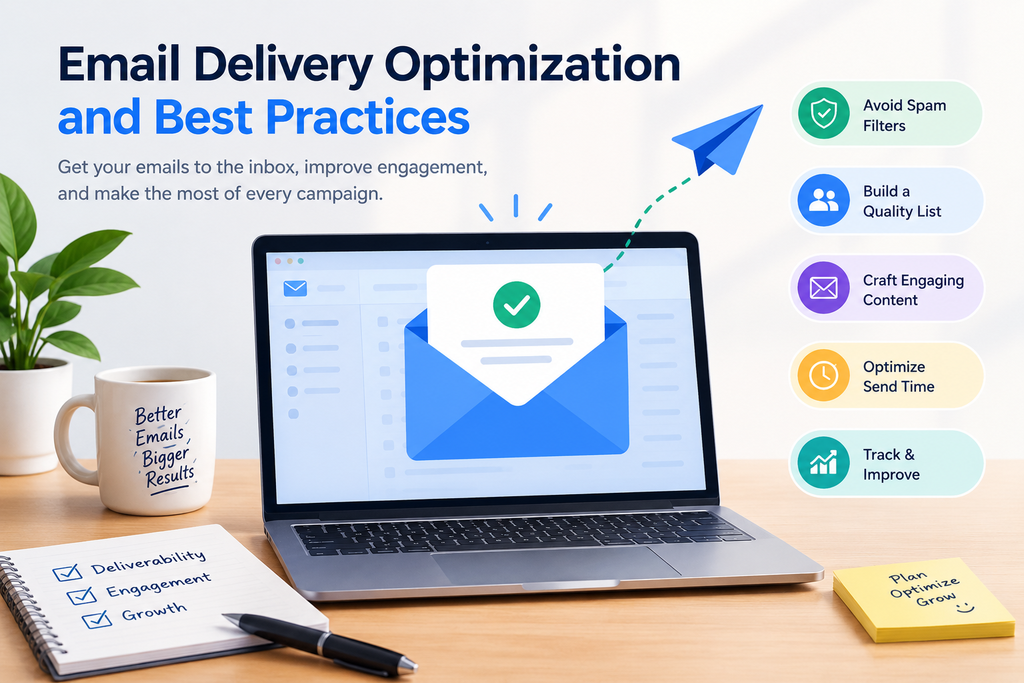
Email Delivery Optimization and Best Practices
Achieving high inbox placement requires a strategic approach to your entire email infrastructure. By focusing on email delivery optimization, you ensure that your messages reach their intended destination rather than the spam folder. Following established email delivery best practices creates a foundation of trust between your domain and mailbox providers.
Maintaining Accurate, Permission-Based Recipient Lists
The quality of your mailing list is the most critical factor in your sender reputation. Always use confirmed opt-in methods to ensure that every recipient has explicitly requested your content. Regularly scrubbing inactive or invalid addresses prevents high bounce rates that can damage your domain standing.
Configuring SPF, DKIM, and DMARC Correctly
Authentication protocols act as your digital passport, proving that you are authorized to send on behalf of your domain. SPF lists your approved IP addresses, while DKIM adds a cryptographic signature to verify message integrity. DMARC ties these together by providing instructions to receiving servers on how to handle messages that fail authentication.
| Protocol | Primary Function | Security Benefit |
|---|---|---|
| SPF | IP Authorization | Prevents unauthorized IP usage |
| DKIM | Message Integrity | Ensures content remains unchanged |
| DMARC | Policy Enforcement | Instructs servers on failure handling |
Warming New Sending Domains and IP Addresses Gradually
Mailbox providers are naturally suspicious of sudden spikes in email volume from new sources. You must warm up your infrastructure by starting with small, highly engaged segments of your audience. Gradually increase your volume over several weeks to establish a positive reputation with major providers like Gmail and Outlook.
“Deliverability is not a destination, but a continuous process of building and maintaining trust with the people who receive your messages.”
Monitoring Bounce, Complaint, Blocklist, and Engagement Signals
You should treat your delivery metrics as a real-time health dashboard for your marketing efforts. High complaint rates or sudden appearances on blocklists are clear indicators that your content or targeting needs adjustment. Focus on engagement signals like opens and clicks to prove to ISPs that your audience values your communication.
Choosing an Email Queue Service for Reliability and Visibility
A professional email queue service provides the necessary tools to manage high-volume traffic without overwhelming recipient servers. Look for platforms that offer granular control over retry windows and clear visibility into why specific messages were deferred or rejected.
This level of transparency is essential for maintaining consistent performance and troubleshooting delivery issues before they escalate. When evaluating providers, understanding email queue vs email delivery can help you determine whether a platform provides sufficient visibility into both queue processing and final server acceptance.
A clear understanding of email queue vs email delivery makes it easier to interpret email statuses and troubleshoot delayed messages.
Improve Inbox Placement
Turn successful server delivery into better inbox visibility. Strengthen authentication, sender reputation, recipient lists, and delivery practices to help your emails reach the right folders.
Conclusion
Understanding the distinction between email queue vs email delivery transforms how you manage your digital outreach. You now recognize that a message waiting in a queue is merely the first step in a complex journey toward the recipient.
Successful communication requires more than just clicking a button. You must view sent, delivered, opened, and clicked as distinct milestones. Each stage provides unique data points that help you refine your strategy for platforms like Gmail or Outlook.
Reliable results depend on your ability to combine robust authentication with smart queue management. You should prioritize clear status monitoring to identify bottlenecks before they impact your sender reputation. Consistent optimization of your sending practices ensures your messages reach the inbox rather than the spam folder.
Take control of your technical setup today. By balancing the nuances of email queue vs email delivery, you build a stronger connection with your audience. Your commitment to these best practices will lead to better engagement and more effective communication across every campaign.
FAQs
What is the fundamental difference between an email queue vs email delivery?
An email queue is a controlled holding area where your message waits for processing, routing, or a retry attempt by a server. In contrast, email delivery is the specific moment the recipient’s mail server, such as Google Workspace or Microsoft Exchange, successfully accepts your message. Queueing happens during the email sending process, while delivery marks the successful handoff to the destination.
Why does my mobile device occasionally show “queue email gmail” in the outbox?
When you see queue email gmail status, it typically means the Gmail app cannot immediately transfer your message to Google’s outgoing servers. This is often caused by a lack of internet connectivity, large attachments, insufficient account storage, or synchronization errors. Once your connection stabilizes or the sync completes, the email queuing system will automatically attempt to resume the transmission.
How does an email queuing system handle high volumes of outgoing messages?
A robust email queuing system uses email queue management to prioritize messages based on type. For example, transactional emails like password resets are often placed in a high-priority queue, while marketing blasts are processed in bulk. This system manages traffic spikes and adheres to rate limits set by providers like Yahoo or Hotmail to prevent your IP from being flagged as a spam source.
Can a message be “Sent” but not “Delivered”?
Yes. Your email client marks a message as “Sent” once it successfully leaves your local device and is accepted by your outgoing SMTP server. However, email delivery only occurs once the recipient’s server provides a 250 SMTP success code. If the recipient’s server is down or the address is invalid, the message may be sent from your end but fail to be delivered, resulting in a bounce.
What are the essential email delivery best practices for businesses?
To ensure your messages reach the inbox, follow email delivery best practices such as implementing SPF, DKIM, and DMARC authentication protocols. You should also maintain a clean, permission-based recipient list, monitor your sender reputation, and use a dedicated email queue service like Postmark or SendGrid to handle sophisticated retry logic and delivery reporting.
Why does email delivery optimization matter if my emails are already reaching the recipient’s server?
Successful delivery does not guarantee inbox placement. Email delivery optimization involves fine-tuning your content, headers, and sending frequency to satisfy the sophisticated spam filters of providers like Gmail. Even if a server accepts your email, it can still be routed to the spam or promotions folder based on your sender reputation and recipient engagement levels.
How do retries and exponential backoff function within email queue management?
When a receiving server issues a temporary “4xx” error, effective email queue management employs exponential backoff. This means the email queue service will wait for a short period before trying again, gradually increasing the time between attempts. This strategy protects your sender reputation by not overwhelming the recipient’s server during temporary outages or greylisting periods.
What role do DNS and MX records play in the email sending process?
Before an email can move from a queue to delivery, your sending server must perform a DNS lookup to find the MX (Mail Exchanger) records for the recipient’s domain. These records identify which specific mail servers are authorized to accept messages for that domain, allowing the SMTP conversation to begin at the correct destination.